Photo by Aerps.com on Unsplash
Introduction
I’ve been working with Cursor for almost a year now. I’m a Senior Engineer at Branch International, where I’ve been for about 1.5 years. My job mostly involves updating old code or rewriting parts of the system, along with some projects for adding new features. Writing new code is often easier, but updating old code is harder — you have to make it better and easier to maintain without breaking anything that’s already working. Before using Cursor, I used Sublime Text for more than 10 years and always preferred fast, simple editors over full-featured IDEs like IntelliJ. I mainly write backend code in Ruby with a bit of frontend work.
2025 was significant
ChatGPT was launched in 2022, making AI accessible to the general public for the first time. Shortly thereafter, tools like GitHub Copilot emerged, leading to a rapid increase in adoption among developers. I personally utilized ChatGPT as a mock interviewer during my interview preparation in early 2024. Cursor was released in late 2024, and I began using it in December of that year. Transitioning to a new editor after more than a decade was challenging, but a few plugins allowed me to recreate my Sublime setup, including shortcuts, extensions, and themes. I have not looked back since. The year 2025 was also pivotal for Cursor as a company. A startup founded by first-time MIT entrepreneurs successfully captured over 50% of the market share, despite facing competition from Microsoft-backed GitHub Copilot and other similar tools.
On a personal note, my daughter was born in March 2025. This change initially threw off my work routine, but with some disciplined deep-work sessions and AI assistance, I managed to get back on track and even boost my productivity.
Improved Productivity with AI
My role at Branch is filled with exciting opportunities to connect through meetings—stand-ups, 1:1s, unblocking sessions, interviews, and sometimes process-related discussions. To make the most of my time and keep meetings from taking over, I follow a few strategies:
-
I start my day early, around 8-9 am (depending on how well the baby lets us sleep 😂). This allows me to carve out focus slots before meetings begin.
-
I push back or skip meetings where my presence isn’t crucial. Saving 30–60 minutes of uninterrupted time is more valuable than being passively present.
-
Weekly 1:1s without progress can become repetitive. Addressing this early frees up time for both parties to focus on what truly matters.
-
I try to schedule one interview per day. Design interviews already last more than an hour so it’s hard to take multiple interviews in a day.
-
I prioritize attending mandatory org-wide meetings and enjoy the flexibility of watching recordings for the rest.
After all this, the time left for engineering tasks is limited, so I need to ensure I don’t waste any of it. I was fortunate to read Deep Work by Cal Newport a few years ago, which helped me apply some ideas to optimize my working style. I also wrote a detailed post on this topic if you’re interested in reading more). Since my role involves a lot of refactoring and rewriting, AI tools help me stay productive despite all these meetings.
AI @ Branch
Before moving ahead, I’d like to explain how Branch views AI, as its usage becomes increasingly important when the organization encourages widespread adoption. In December 2024, I began using Cursor with a personal subscription. Some developers were already using GitHub Copilot or similar autocomplete tools, but none reported a significant productivity boost. Initially, I used Cursor for autocomplete, but after a few weeks, I started utilizing its agent mode, which allows interaction with AI to accomplish tasks. Having coded independently for over a decade, it took time to trust AI and grant it more control. As more developers in our organization began using Cursor, they reported increased productivity. This topic was discussed in our weekly engineering calls, leading to the creation of a working group to evaluate available tools for potential adoption by the entire team. Options like Copilot, Claude Code, and Cursor were considered, and the team began evaluating them.
The AI landscape is constantly evolving, making it challenging to conclude research. However, by mid-year, Branch had enterprise accounts for multiple AI tools, allowing developers to choose based on their preferences, IDE, and comfort level. Additionally, we hosted a hackathon where participants from outside the engineering team built projects without prior coding knowledge. This was just the beginning, and the organization is still working on optimizing workflows for all teams using the available tools.
My Cursor Usage
I started using Cursor like you all did - tab tab tab 🤣. These tools quickly grasp the context of your code. If you’re still writing all the code yourself, you’ll notice it peeking into your work and completing a line of code for you, suggesting the next line, or even the entire method. This is the most basic use of any AI-based editor.
Below, I’ll talk about my setup, some tweaks, and my usage style that boosted my productivity in 2025.
Understanding Different models - Cost vs. quality
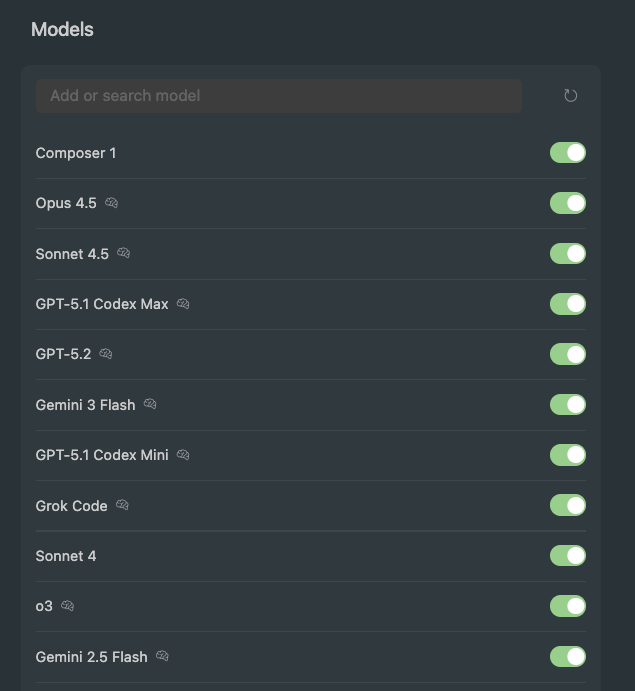
Just like other tools, Cursor supports multiple LLM models from different vendors ranging from OpenAI’s GPT models to Anthropic’s Opus/Sonnet, Google’s Gemini and their own recently launched model Composer 1. I won’t go into comparisons of these models but you must have a basic understanding of when to use different models. When choosing between different AI models, it’s important to consider their strengths and limitations. Thinking models such as Opus and Sonnet are better suited for complex tasks due to their advanced reasoning capabilities and ability to handle nuanced queries. However, these models can be slower and may require more computational resources. On the other hand, models like Composer are designed for speed and efficiency, making them ideal for tasks that require quick responses but are not overly complex. Additionally, context windows play a crucial role in determining how much information a model can process at once. Larger context windows allow models to consider more information simultaneously, which is beneficial for understanding intricate problems. However, “larger context” also means slower processing times for a long running thread.
I’ve been using Cursor in auto mode for many months. It picks a model based on the task, but sometimes the responses were too slow, so I started trying different models. Here are a few reasons for the slowness:
-
When the context window was about 80-90% full, it became large enough to slow down future conversations.
-
At around 98-99%, many conversations just stopped, and I had to start a new one, losing all the context 😔.
-
Sometimes, there was random slowness, which suggested their API might have been down or slow, like any other backend service.
Thankfully, by September 2025 Cursor launched context summarisation that triggers automatically. You can also use /summarize command to trigger it on-demand.
Just like everyone else, I love coding quickly, so I tried out Cursor’s Composer model. I usually give smaller tasks with clear context to Cursor, and Composer-1 handled these simple tasks pretty well. I chatted with my colleagues about it, and they found it to be an average model for anything more complex. These days, I use a mix of Sonnet, Opus, and Composer for my projects.
Configuring how agents work
There are various ways in which you can provide a good initial context to the agent before it starts working on your task according to your prompt. As we’re using both Copilot and Cursor in our organisation, few folks from a working group have spent some time defining the configuration for both of these tools. Copilot searches for .github/copilot-instructions.md in your repository rules whereas Cursor has multiple ways of defining rules and configuring the agent (eg. using AGENTS.md). When you are defining these configurations, consider including things like:
-
Project’s coding standards: Provide detailed guidelines for designing and organizing components within the codebase. This includes specifying folder structures, naming conventions, and rules for using components like models, services, and controllers. It ensures consistency and adherence to best practices across the project.
-
Workflow Selection Criteria: Clearly define the conditions under which each workflow should be selected. This includes specifying when product, design, coding, testing, and review workflows are applicable. This ensures that the appropriate workflow is triggered based on the task requirements.
-
Testing and Domain Specifications: Outline the testing plan, including the types of tests and their locations. This helps in maintaining a clear understanding of the project’s structure and ensures comprehensive testing coverage.
-
Error Handling and Logging: Define how errors should be handled within each workflow. Include guidelines for logging errors and exceptions to ensure that issues can be tracked and resolved efficiently.
-
Security and Compliance: Outline any security protocols or compliance requirements that need to be adhered to during the development process. This could include data protection measures, access controls, and encryption standards.
In brief, treat the agent as an integral part of your engineering team by providing it with a comprehensive understanding of the problem you’re addressing. This approach ensures that each task the agent undertakes aligns with the expected quality standards. However, be mindful not to overload the initial context with excessive details, as this could consume a significant portion of the context window or lead to some instructions being overlooked. For example, if there are some very specific instructions, don’t include them in this configuration. You can mention those instructions or provide some files as a reference while solving that particular task.
Planning is still the most important step
A detailed task description is crucial for successful AI integration, as the quality of the output is directly related to the clarity of the input—essentially, garbage in, garbage out. By providing clear and comprehensive instructions, you enable AI to deliver more accurate and useful results.
I’ve written some internal posts at my organization on how to effectively break down and estimate tasks. Throughout my career, I have observed that many engineers face challenges with medium to large projects due to lack of proficiency in breaking them down into milestones and tasks. Projects often begin smoothly, but confusion tends to arise midway, leading to a rushed conclusion. This typically results in the submission of large pull requests with a significant blast radius.
With AI as your assistant, planning still remains one of the most important task in SDLC. Those who have reaped the most benefits from AI are typically individuals who excel at planning and breaking tasks. They understand that AI is not a magic wand that can replace the need for skilled software engineers. but a powerful tool that can enhance productivity when used correctly.
I’m not great at writing long prompts, so I’ve been handling my projects by breaking them down myself. I often have design discussions with AI when needed and then assign individual tasks to the tools to solve. This approach has worked well and quickly for me because:
-
Not everything is outsourced to AI so I completely understand the problem statement. At times, it’s easy to lose context of the problem at hand by completely letting AI solve it.
-
Smaller problems are solved faster, so I can see the results immediately. I can then proceed to testing and raising smaller PRs for the individual tasks.
-
The code might be generated using AI but it will be committed against my name. In the future, if something breaks then the ownership is on me, not on AI. So it’s very important to completely go through the generated code. Even if the code is completely covered by test cases, I don’t get a feeling of satisfaction unless the I completely understand the generated and it looks maintainable enough. By working with smaller diffs, it’s easier to review the generated code completely before commiting
Just like speed, I’m also a fan of smaller feedback loops so I wrote a very short blog on it years ago.
Deeper integrations
Cursor also has integration with our issue tracker (Linear) and version control system (Github). By simply tagging @cursor on a ticket, we can launch a background agent that reads the requirement, understands it, and directly raises a pull request on Github with explanation of the changes. A developer can simply check the diff, see if it meets the requirements & coding standards, and merge the PR 🚀.
Our role as engineers is evolving from primarily writing code to focusing on creating comprehensive and detailed tasks from Product Requirement Documents (PRDs) and design documents. This shift allows AI to handle these tasks efficiently and accurately.
Understanding legacy code
Most of us join teams with existing codebases, often over a decade old, which can be difficult to understand at times. While those who witnessed the evolution of the system can grasp the reasons behind changes, newcomers may struggle to comprehend the current state. Code that spans multiple files or has high cyclomatic complexity is challenging to interpret.
AI tools are quite useful in these situations. I’ve been using AI extensively to understand and rewrite legacy systems. Both Cursor and Copilot have a read-only “Ask” mode which is particularly useful for learning and exploration, unlike the default “Agent” mode that is more suited for updating the code.
It’s hard for humans to unlearn — once a certain way of thinking or solving problems is ingrained, stepping back and approaching it with a completely fresh perspective takes conscious effort but AI can provide a fresh perspective on problems and suggest solutions as soon as you start a new chat window.
While detailed prompts are recommended to execute tasks as per your expectation, it has been beneficial for me to ask AI random questions like “Why is this test case slow”. AI would then inspect the file, our test setup, and all the related files to give a fresh perspective into our setup. Without AI, you would generally treat most of the setup as source of truth. Other examples of random questions include “How can this function be optimized?” or “What are potential security vulnerabilities in this code?” These inquiries can reveal valuable insights and improvements. Additionally, AI can assist in design discussions, offering innovative ideas and solutions that might not be immediately apparent to human developers.
Running shell commands
Often, the agent might need to run a script or execute a shell command. While it might seem risky to let AI access beyond the editor, there are safe ways to do it. Currently, both Cursor and Copilot can run shell commands from the editor’s AI agent and use the output to proceed.
These tools use an allow list to make this process quicker and safer. When an agent needs to run a shell command, it offers three choices: Skip, Run, and Add to allow list. Adding a command to the allow list means that next time, it can run without your permission. This feature is very helpful because I often found Cursor running read-only commands like wc, awk, grep, and sort safely, so it made sense to whitelist these commands. Without this feature, you would have to constantly approve commands in your editor.
It’s not safe to whitelist commands like rm, but since I frequently commit my code, I’ve whitelisted them too. Because Cursor doesn’t run with sudo privileges, this setup is both safe and efficient. For the past two months, I’ve been working on projects that required rewriting the controller layer for many modules. One of my testing goals was to ensure that the JSON output from the old and new controllers matched. If there were differences, I needed to know exactly what changed. I used AI-written scripts to compare each nested key in the JSONs to avoid regression issues. Directly asking AI agents to compare the JSONs could work but might be less precise, so I had it write a script for this task.
For writing tests
Tests are essential for identifying regressions and instilling confidence in the codebase over time. They ensure that new changes do not disrupt existing functionality and help maintain the software’s integrity. Many developers now use AI to write tests, including those who previously avoided writing them. I have long advocated for writing tests, even before the widespread adoption of AI agents. There are two main approaches to writing tests: one targets achieving 100% code coverage, while the other focuses on covering meaningful scenarios. I will outline my approach to writing tests:
-
I’m not into Test-Driven Development (TDD), but I ensure that I write tests for most of the features I touch.
-
As the code is already written and I maintain a clean coding style, I can easily identify which code paths need testing.
-
I determine the types of tests required, which generally include unit tests (for individual classes), controller tests (to test a controller’s journey), and end-to-end tests (covering complete scenarios involving multiple controller invocations).
-
To avoid reviewing subpar AI-generated code, I provide an initial structure for the AI to follow, allowing it to handle the repetitive tasks.
A sample in Ruby might look like this:
RSpec.describe <file> do
  # leave setup data for AI

  describe '#method_to_test1' do
    context 'when scenario 1' do
      # leave this for AI to fill
    end

    context 'when scenario 2' do
      # leave this for AI to fill
    end
   ...
  end

  describe '#method_to_test2' do
    context 'when scenario 1' do
      # leave this for AI to fill
    end

    context 'when scenario 2' do
      # leave this for AI to fill
    end
  end
end
I’ve been encouraging my juniors to write tests this way (since before the AI era) — first list the scenarios, then dive into the details. Doing it this way ensures you think through the scenarios carefully without getting into the specifics of setup code or mocks. If you start writing tests for one scenario without defining all of them, you might have to switch your focus between thinking about cases and writing the actual test cases. Fortunately, the grunt work can now be outsourced 😎.
I’ve also tried without giving AI the structure and I didn’t get good output. But it was some time ago, maybe the models have improved now. Or a better idea would be to frame the prompt like this:
Write tests cases for @this_file. Refer @that_file for understanding how to organise the scenarios.
MCP servers
If you have not yet explored MCP servers, you’re missing out on some serious automation. Most of the popular websites have rolled out their MCP servers and people are already building agents over them 🚀. While I’ve not developed any full fledged agentic workflows yet, these are the things that I’ve used MCP for:
-
Debugging high impact production issue - Our major backend web application is a monolith that’s deployed twice a week. Every month, I get to handle my team’s on call for a week. In August 2025, I got an issue assigned that was causing problem in a specific module which was essential for all markets, so it had a major impact. Seeing the charts, it was clear that something started breaking after the most recent deployment. While rolling back the entire release was an option, it is not always the preferred path because a release contains work of multiple developers and unless it’s a SEV0, you would not want to revert everyone’s work. But I was not able to catch the issue by manually looking into the code as there were no recent changes around the impacted code or it’s parent classes. I had recently integrated Github MCP with Cursor, and I thought of debugging this issue with MCP integration. Because each release going to production has a PR, I gave the PR link and the exception trace to Cursor and asked it to debug the same using Github MCP tools. Within a minute, it was able to point out that a framework upgrade has also went live within the same release and some methods we used in our module could have been impacted in the newer version. It gave me a direction to look into and that was the exact issue which I fixed later and released within next one hour.
-
Filing >100 tickets - We use Linear as our issue tracker and I had a use case of filing many linear tickets with a given title and details. Apart from this, the tickets had to be assigned to people from multiple teams so I had to ensure that the project is linked to their team’s board. I spent half hour with Cursor and I was able to file 100+ tickets with accurate details and team information. In a pre-AI world, this would anyways be done with a script but the effort of writing that by hand got eliminated.
-
Frontend tasks - I recently got assigned some UI work for an urgent task. While I’ve been a full-stack engineer but my inclination has been towards backend only. I googled and found out that our design platform (Figma) also has a MCP server that can be connected to AI editors. Within minutes, I could access designs from my editor and give commands to build specific parts of the page. This entirely eliminated the mental effort in building UI structure by hand.
Avoiding AI Slop
AI slop code refers to low-quality, often buggy, insecure, or nonsensical code generated rapidly by AI tools, lacking true value or originality, and is a significant concern as it can introduce errors like missed security checks, hallucinated functions, and inefficiency, but can be avoided by experienced developers using AI as a supplement, not a replacement, and always validating the output.
It’s very common to get excited with everything happening in the AI world and put it in the driver’s seat, but that can quickly backfire. AI models work by predicting the next token based on patterns learned from large datasets. They don’t truly understand your system, its constraints, or its long-term trade-offs. Because of this, the output may look correct and even pass tests, yet still be suboptimal, brittle, or misaligned with your architecture. Your organisation has hired you, not an AI agent, so it’s your responsibility to ensure that while AI output helps you move faster, it doesn’t quietly introduce slop into the codebase.
Few months ago, when more people in our team started using AI tools, I got to see a lot of obvious comments after every few lines in their pull requests. If you’ve been a Ruby developer, you know that the style guide says this about comments:
Good code is its own best documentation. As you’re about to add a comment, ask yourself, “How can I improve the code so that this comment isn’t needed?”. Improve the code and then document it to make it even clearer.
Having coding in Ruby for more than a decade, I generally write close to zero comments in my code (feel free to call me extremist here 😂). There are very rare cases sometimes when you see a specific complexity in the codebase that would take time to refactor so in those cases I leave a useful comment. This is one example of AI slop but there can be many more. For example, if you’re designing web pages using AI and you don’t give them sufficient context of your overall application and design scheme, the AI agent would end up redefining a lot of unneeded CSS inline just to match the design.
In my knowledge, there are two easy ways to avoid such slop:
-
Define the
Agent.md,copilot-instructions.mdor similar files to setup top level behaviour for the agent. -
Ensure your prompts are clear enough so that no slop is generated.
Even then if you get any such sloppy code, it’s your responsibility to clean that up manually before committing.
Is AI eliminating software engineers?
From my personal experience, and from listening to respected industry voices, I’ve concluded that AI today can help you build apps from scratch and even get some paying users. But building serious applications is still fundamentally a system design problem that needs experienced engineers. You need a simpler stack, fewer proxies, fewer network hops, and carefully optimised code to run systems efficiently at scale.
Also, in the realm of serious software development, writing code is just one part of the job. A significant amount of effort goes into prioritizing tasks, deciding on product behavior, managing releases, providing post-release support, ensuring observability, debugging through logs and metrics, and handling incidents. Automating parts of code writing, even though they still need testing, reviewing, merging, and releasing, optimizes about 15-20% of the overall process.
Still AI saves a lot of valuable time for the engineers and significantly reduces costs, which is truly impressive. So if you ask me: Do we still need developers?. I’d say absolutely. We probably need fewer of them.
Two edged sword
AI is undeniably powerful and already indispensable. The challenge is to use it as a leverage tool, not as a crutch, so that we don’t trade long-term engineering strength for short-term speed. While I regularly use AI in my work, I see a few long-term issues that are worth talking about:
-
Today vs 5-10 Years Ago - I started coding professionally in 2015, when StackOverflow was the OG. Until around 2022, someone who coded fast was usually someone who had coded for years and had built both speed and expertise by writing code for a long time. That relationship has changed. AI now makes everyone a designer, a poet, and a coder. The problem is not capability, it’s learning. A large part of the learning is shifting from humans to machines. For example, I’m fluent in Ruby and reasonably comfortable with Java and JavaScript. If you ask me to write C or C++, I’ll still open an editor like Vim and rely on what I learned in college 12–13 years ago. But if you ask me to write Go or Rust today, I’ll most likely describe the idea to an AI editor. I’ll ship a “hello world” in seconds and probably an MVC app in days, but I may never become truly comfortable with those languages without AI. Human brains get comfortable with syntax by writing it again and again. Outsourcing that repetition to AI speeds up delivery, but it slows down internalisation. While writing this, I also remembered my first company’s interview process, where I wrote C++ code with pen and paper 🤠. Will people ever do that again? Maybe I’m overthinking or sounding old, but the idea is simple: programming languages are slowly becoming interfaces for people who don’t deeply understand their syntax, treating engineers and non-engineers alike. The upside is that new developers will ship and debug production code much faster than we ever did. The downside is that it may take them much longer to become fluent in any one language. Whether this is good or bad — only time will tell.
-
Long-Term Maintainability - A big worry is “AI slop.” Code gets approved not because it’s well understood, but because it works and passes tests. Developers might accept suggestions they don’t fully understand, especially when rushed. Over time, this results in codebases that are harder to understand, harder to change, and fragile in unexpected ways.
-
Skill Atrophy and Debugging Depth - When AI writes most of the scaffolding and glue code, developers spend less time building a mental model of the system. This can show up during incidents. Debugging distributed systems, performance issues, or subtle data bugs still requires deep understanding, not just good prompts. If that understanding erodes, incident recovery times can increase, even if development felt faster initially.
-
Lock-In and Rising Costs - Currently, AI tools are relatively affordable due to growing adoption and high competition. However, as teams and individuals become increasingly dependent on these tools, pricing power will shift. When these tools become essential for development, costs are likely to rise. At that point, opting out will be mentally challenging. While the costs might still be more justifiable than hiring additional engineers, only time will reveal how cost-effective these tools will remain.
Personal targets for 2026
With 2025 bringing so many improvements in these AI models, I’m excited to see what we have for 2026 and beyond. For this year, I’m looking to try out a few things:
-
Agentic workflows -Automation has been around in software engineering for a long time, but creating it has become easier with Agentic workflows. I explored tools like n8n in late 2025 when my manager made a small agent to set up a daily alert on some reports. Building agentic workflows on these platforms is like drawing diagrams. It’s easier because of the visuals, and it lowers costs by cutting out
the need for software engineers. While the tool is very powerful, I didn’t have any ideas to implement, so I didn’t create any agentic workflows last year. I’m usually not great with ideas, but I’m hopeful that this year I’ll develop an agentic workflow for personal use or a production application. Let’s see if I can achieve this 😎.
-
Cursor commands (more) - I’ve heavily used cursor this year and often searched for old chats when I had to perform similar tasks so that I’m not required to provide the same prompt again. While this is doable and context window isn’t a problem after context summarisation feature, a better method would be to create reusable prompts and commit them to the respective repo. I’ll try to find such use cases and create their cursor commands to help both myself and the wider team.
-
Agent skills (more) - I got to hear about this very recently. The idea is that agent can pick a skill to perform a specific task and using a markdown file, it would know how to do that task in your preferred way. I believe this would mean that you no longer need long, carefully crafted prompts or repeated context-setting every time you need to perform these tasks since the agent already knows how to perform the task, what steps to follow, and what constraints to respect.
-
End to end execution with AI - For small projects, I generally start implementing my tasks without creating detailed technical tasks from the PRD. Even for technical projects, I’ve seen that my project description is detailed but the individual tasks have minimal information. Recently, some folks in my organisation are exploring AI for end to end execution. The flow looks like:
-
Create a design doc from PRD (manually or with AI’s help).
-
Use AI to create project, tasks and milestones from design doc. These tasks would include required details with code snippets, or any other thing that would help the agent understand the context deeply.
-
Run agents (sequentially or parallelly) to execute each task and monitor the generated code.
-
-
Parallel agents / subagents - Till now, my way of using AI has been to give it a task and stay glued to the editor screen because the tasks are small enough and agent respond mostly within a minute. But the real power lies in giving them different tasks simultaneously to improve efficiency.
Conclusion
As the AI landscape has evolved in 2025, it feels increasingly realistic to pursue these goals and even beyond. The steady pace of improvement in AI tools opens up new possibilities for efficiency and experimentation, but it also comes with trade-offs that require thoughtful adoption rather than blind optimism. With a focus on learning, adapting, and using these tools deliberately within real-world constraints, I see room to make meaningful progress without losing sight of engineering fundamentals.
I’d genuinely like to learn from others here. So if you’ve developed useful workflows, or discovered patterns that work well in real production environments, please share them in comments.